
App Store Screenshots (7)



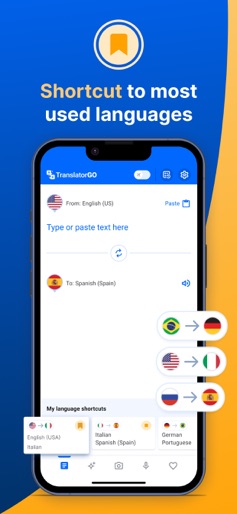
Design Analysis
Visual Design
App Insights
About Translator GO: AI Translate
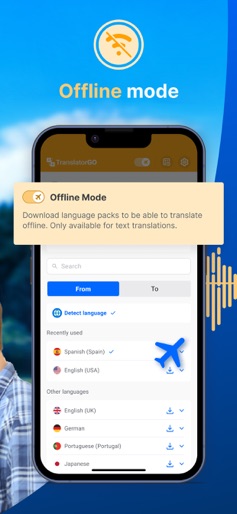
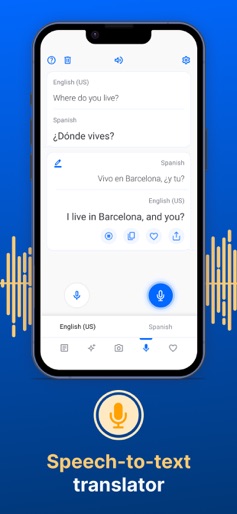
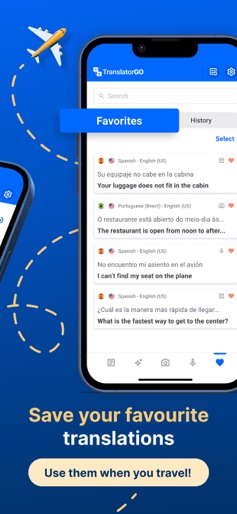
Powered by cutting-edge AI technology 110+ languages Photo, text and voice translations in real-time! Introducing the next level of language translation with Translator GO - now powered by AI technology. Our translator app is for anyone that wants to speak and understand any foreign language. You can finally say “adiós!” to awkward language barriers and communicate fluently when traveling or socializing. Offline Mode lets you use Translator GO abroad without having to pay any expensive roaming charges. No more searching for Wi-Fi! Easily translate photos, text and speech in over 110 languages. ◉ ADVANCED FEATURES: - AI translation Seamless translations with our new AI feature. Simply input or copy the text you want to translate, select the desired languages, and let our chatbot handle the rest. You can also personalize your translation to suit your preferences: adjust the tone or get an alternative translation for more precision. - Voice translation Effortlessly engage in conversation using voice-to-voice translation. Understand anyone and make yourself understood in any language. - Camera translation Take a photo of any text you want to translate. Translate menus, notices, and documents with the click of a button. - Text to text translation Easily translate words, phrases, and sentences in a few seconds. Simply enter the text you want to translate for instant results. - Text to speech / speech to text translation Enter text to get a spoken translation, and vice versa. Practice your pronunciation and speak with confidence using this automatic transcription feature. - Offline Mode Forget needing an internet connection when traveling with Translator GO. Never worry again about roaming charges, finding Wi-Fi, or 4G/5G. Translate anywhere you are, whenever you want. - Phrasebook: Your handy guide to most useful phrases in different languages. From travel expressions to everyday essentials, browse phrases by category or save your own custom entries for easy access on the go. Available offline. ◉ EXTRA FEATURES - Text autocorrection - Copy and share translations - Speed up or slow down voice translations - Autospeak function to hear the correct pronunciation - Save your favorite translations and translation history ◉ LANGUAGES SUPPORTED With Translator GO, you can translate text and speech into more than 110 languages: Afrikaans, Albanian, Amharic, Arabic, Armenian, Azerbaijani, Basque, Belarusian, Bengali, Bosnian, Bulgarian, Catalan, Cebuano, Chichewa (Malaui), Chinese, Corsican, Croatian, Czech, Danish, Dutch, English, Esperanto, Estonian, Filipino (Tagalog), Finnish, French, Frisian (West), Galician, Georgian, German, Greek, Gujarati, Haitian Creole, Hausa, Hawaiian, Hebrew, Hindi, Hmong, Hungarian, Icelandic, Igbo, Indonesian, Irish, Italian, Japanese, Javanese, Kannada, Kazakh, Khmer (Camboya), Kinyarwanda, Korean, Kurdish (Kurmanji), Kyrgyz, Lao, Latin, Latvian, Lithuanian, Luxembourgish, Macedonian, Malagasy, Malay, Malayalam, Maltese, Maori, Marathi, Mongolian, Myanmar (Burmese), Nepali, Norwegian (Bokmål), Odia (Oriya), Pashto, Persian, Polish, Portuguese, Punjabi (Gurmukhi), Romanian, Russian, Samoan, Scottish Gaelic, Serbian, Shona, Sindhi, Sinhala (Sri Lanka), Slovak, Slovenian, Somali, Spanish, Sundanese, Swahili, Swedish, Tajik, Tamil, Tatar, Telugu, Thai, Turkish, Turkmen, Ukrainian, Urdu, Uyghur, Uzbek, Vietnamese, Welsh, Xhosa, Yiddish, Yoruba and Zulu. ◉ TRANSLATOR GO PREMIUM It’s free to download Translator GO. Upgrade to Premium for full access to all features, you can cancel your subscription anytime. No extra fees to pay! An internet connection is required to use the app. To activate “Offline Mode”, you need to download language packs. ◉ CONTACT For further information or app support please contact us at infotranslatorgo@mobileapptools.app Terms of use: https://mobileapptools.app/translations/term-of-use Privacy policy: https://mobileapptools.app/translations/privacy-policy
Create screenshots like Translator GO: AI Translate
Use FlyerBanana's free editor to create professional App Store screenshots inspired by Translator GO: AI Translate's design. 100+ templates, device frames, and one-click export.










