Time Planner: Schedule & Tasks icon

Time Planner: Schedule & Tasks

Oleksandr Albul

Lifestyle
4.0(22.6K ratings)
Free
Create Screenshots Like Time Planner: Schedule & Tasks

App Store Screenshots (24)

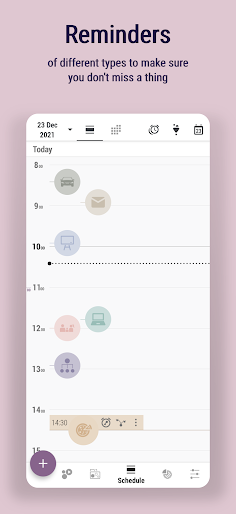
Time Planner: Schedule & Tasks screenshot 1
Time Planner: Schedule & Tasks screenshot 2
Time Planner: Schedule & Tasks screenshot 3
Time Planner: Schedule & Tasks screenshot 4
Time Planner: Schedule & Tasks screenshot 5
Time Planner: Schedule & Tasks screenshot 6
Time Planner: Schedule & Tasks screenshot 7
Time Planner: Schedule & Tasks screenshot 8
Time Planner: Schedule & Tasks screenshot 9
Time Planner: Schedule & Tasks screenshot 10
Time Planner: Schedule & Tasks screenshot 11
Time Planner: Schedule & Tasks screenshot 12
Time Planner: Schedule & Tasks screenshot 13
Time Planner: Schedule & Tasks screenshot 14
Time Planner: Schedule & Tasks screenshot 15
Time Planner: Schedule & Tasks screenshot 16
Time Planner: Schedule & Tasks screenshot 17
Time Planner: Schedule & Tasks screenshot 18
Time Planner: Schedule & Tasks screenshot 19
Time Planner: Schedule & Tasks screenshot 20
Time Planner: Schedule & Tasks screenshot 21
Time Planner: Schedule & Tasks screenshot 22
Time Planner: Schedule & Tasks screenshot 23
Time Planner: Schedule & Tasks screenshot 24

Design Analysis

Visual Design

Style: Custom Material

Colors:
accent
primary
secondary
Bottom Navigation BarFloating Action Button (+)Tabbed Top NavigationExpandable List Views

Key Features Shown

  • Nested Subcategories
  • Bubble-based Time Logging
  • Multi-level To-do Lists
  • Timeline Schedule View
  • Part of Day Planning

App Insights

Target: Productivity-focused individuals, students, and professionals looking for an all-in-one time management tool (Calendar + To-Do + Habit Tracker).

Monetization:
  • In-App Purchases
  • One-time Pro Version Purchase

ASO Keywords:

TimePlannerScheduleTasks

About Time Planner: Schedule & Tasks

Do you also keep planning 100 things a day to see you accomplish maximum 10 in the end? Does your time fly very fast as well? Have you ever thought, where it has disappeared? Quit wondering where, see it with your own eyes! If you are tired of keeping lots of time management apps like calendars, to-do lists, habit trackers, timers, alarms, note pads, try Time Planner that has all those tools included. Save time and boost your productivity in different areas of life! Why this App? • Fast and optimized time management tool • Absolutely no ads (seriously!) • Convenient schedule with timeline and part of the day modes • Easy time tracking with bubbles • Handy customizing with loads of icons and colors • Hierarchical structure of categories and subcategories • Reminders of different types • Task priority marks • Notes with rich formatting • Alarm + captcha to fight procrastination • Moon calendar • Import events from Google calendar • Backup Additionally for Pro version: ▸ Unlimited and detailed statistics of your expectations and the reality ▸ Multiple nesting levels of subtasks ▸ Various filters ▸ Timer, stopwatch and countdown ▸ Widget for quick access ▸ Enriched settings, including more sounds Also our users proved this app goes well with: 🌞 Early wake ups 🚰 Water drinking monitoring 🚭 Controlling bad habits like smoking 📥 Quitting constant email / feed checking ⚖️ Finding balance between work and family 🎾 Making more time for hobbies 🏠 FlyLady housekeeping system 🥕 Finding self motivation to get things done 🎯 Being focused and concentrated on what you're doing Follow us: https://www.facebook.com/OlekdiaTimePlanner https://www.youtube.com/c/olekdia https://olekdia.groups.io/g/timeplanner/topics

Create screenshots like Time Planner: Schedule & Tasks

Use FlyerBanana's free editor to create professional App Store screenshots inspired by Time Planner: Schedule & Tasks's design. 100+ templates, device frames, and one-click export.


More Lifestyle Apps

View all

Frequently Asked Questions

How can I create screenshots like Time Planner: Schedule & Tasks?
You can create App Store screenshots inspired by Time Planner: Schedule & Tasks using FlyerBanana's free screenshot editor. Choose from 100+ templates, customize colors, text, and device frames, then export in all required sizes.
What screenshot sizes does Time Planner: Schedule & Tasks use?
Time Planner: Schedule & Tasks uses standard App Store screenshot sizes including 6.7" (1290×2796px), 6.5" (1284×2778px), and 5.5" (1242×2208px) for iPhones. FlyerBanana supports all required sizes with one-click export.
Can I use Time Planner: Schedule & Tasks's screenshot style for my app?
Yes! While you shouldn't copy screenshots directly, you can use Time Planner: Schedule & Tasks's design patterns as inspiration. FlyerBanana's templates let you create professional screenshots with similar layouts, color schemes, and visual styles.
What makes good Lifestyle app screenshots?
The best Lifestyle app screenshots clearly showcase key features, use consistent branding, include compelling copy, and follow App Store guidelines. Browse our Lifestyle inspiration gallery to see what top apps do well.