

App Store Screenshots (8)


Design Analysis
Visual Design
App Insights
About Tappsk: ToDo & Habit Tracker
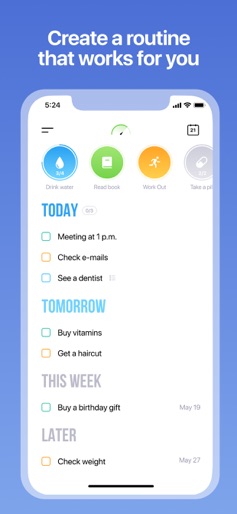
Our mission is to replace your planner, habit tracker, reminder app, and calendar with a single app, so you can concentrate on whatever needs to be done instead of wasting time on each separate app. We've put an incredible amount of effort into our interface, and as a result it came out clean and simple, while at the same time uniting all of Tappsk's functionality on one screen. Our pride and joy: • The home screen, on which you can see all your tasks and can edit each date with the swipe of one finger. • Forming helpful habits: they're easy to create and even easier to track. • A calendar to see your list of tasks for a particular day. • Reminders you'll never miss! Tappsk will keep reminding you of your pending task until you decide what you want to do with it. • Using your voice to record your tasks has never been easier... • Share your tasks: use any convenient method to send them to your friends and they'll automatically show up in their Tappsk. • Subtasks: create checklists and divide your tasks into smaller chunks. • An array of routine activities based on your interests: select and set the activities you do on a regular basis to appear as often as you like. • Hidden lists: eg., lists of books or movies, which will not show up on the home screen. • A logbook that allows you to analyze your task history from any given day. Lots of tasks, one Tappsk :) If you have any questions or suggestions, feel free to contact our support - hello@tappsk.com, we are always ready to improve! "Premium" feature payment: If you decide to use an unlimited number of recurring tasks, reminders, habits and the "share" function (this is optional), your iTunes account will be charged as soon as you confirm the purchase. The Premium subscription is billed annually. The App Store will automatically renew your subscription after 1 year unless auto-renew is turned off at least 24 hours before the end of the current period. You can turn off auto-renew in your Apple ID Account Settings any time after purchase. Privacy Policy: https://tappsk.com/privacy_policy.pdf Terms of Use: https://tappsk.com/license.pdf
Create screenshots like Tappsk: ToDo & Habit Tracker
Use FlyerBanana's free editor to create professional App Store screenshots inspired by Tappsk: ToDo & Habit Tracker's design. 100+ templates, device frames, and one-click export.











