

App Store Screenshots (8)



Design Analysis
Visual Design
App Insights
About Mindblow: Guess the Word!
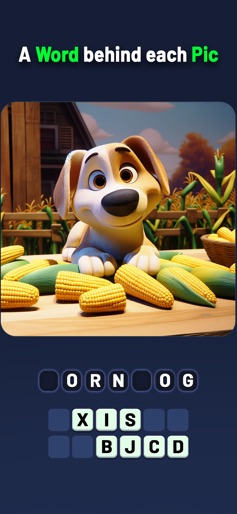
Welcome to Mindblow: Guess the Word! Experience a word-guessing game like no other, where every image cleverly hides a word. Unlike other games, this game isn’t just a mix of stock images, but we've carefully created each level’s image to challenge your brain! Discover the word through a concept creatively depicted in each picture. A New Kind of Puzzle: Forget what you know about word quiz games. In Mindblow: Guess the Word, each image has a special word for you to guess. It’s not just about looking at the picture, but understanding the clever idea behind it. Can you guess the word implied in the picture? - See a worm in a book? The word is "bookworm." - A brick dressed as a superhero, running fast? Say hello to "breakfast." Unique and Eye-Catching: Our images are unlike anything you’ve seen before. They’re not just pretty; they make you think and smile when you guess the word right. Fun for Everyone: Mindblow: Guess the Word is great for kids, adults, and even your grandparents. Play with friends or family and share the fun of cracking these clever puzzles. Challenges for All: From easy peasy to brain-busters, we’ve got levels for every player. Earn coins for right guesses and use them for hints when stuck. Always Fresh: Keep Mindblow: Guess the Word handy on your device. New levels are added to Mindblow every month, so there’s always something fresh to enjoy. More Languages Coming Soon: We’re working on making Mindblow: Guess the Word available in many languages. Get ready for a global word-guessing party! With Mindblow: Guess the Word, start your journey of amazing pictures and satisfying word discoveries. Are you up for the challenge? This game has a subscription-based premium feature package, it enables users to use the app without advertisements and with extra features. It's an auto-renewable subscription. The subscription period is weekly. Payment is charged to the App Store account at confirmation. Subscription is renewed unless turned off 24 hours before the end of the period, and the account will be automatically charged for renewal as well. You may turn it off in your Account Settings anytime. Terms of Use: https://kiddingbox.com/terms.html Privacy Policy: https://kiddingbox.com/privacy.html
Create screenshots like Mindblow: Guess the Word!
Use FlyerBanana's free editor to create professional App Store screenshots inspired by Mindblow: Guess the Word!'s design. 100+ templates, device frames, and one-click export.










