App Store Screenshots (10)


Design Analysis
Visual Design
App Insights
About Match 3D
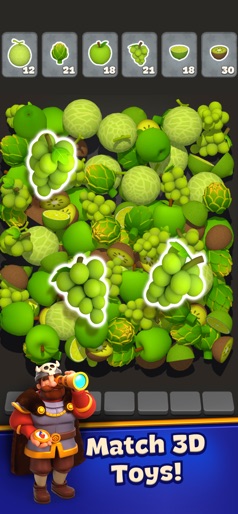
Get ready for a new, challenging and original matching pairs game. You need to match 3D objects on the ground and pop them all! When you clear a level, you will find new objects to pair. Features Shiny 3D visual effects and objects: Every level of Match 3D will give you an enjoyable fun experience of matching 3D objects on the screen, every move you make will give you a satisfying 3D effect that will elevate your game experience. Well-designed brain trainer levels We are happy to tell you that our game will make it easier for you to memorize objects and small details by playing our brain trainer levels, you will start to notice your that memorizing abilities getting better with time. Pause it whenever you want Because we know that you are a busy person, and we value your time, we implemented the pause feature where you are able to pause whenever you want, so you can get back to matching 3D objects anytime you want. Cute animals, sweet yummy food, cool toys, exciting emojis, and much more stuff to puzzle out. Auto-save game to continue from where you left off. Match 3D is easy to play for everyone! Shiny pairs of animals, food, school items, household objects, emojis, and many more exciting type levels to unlock by simply matching the pairs! How To Play 3D Match: - Pick the 1st 3d object it can be (a shiny 3D object, animal, or an emoji) - Then pick up the 2nd 3d object & move both of them to the circle in the middle of the screen. - Keep doing that until you clear the whole screen & win the level. - Then keep having fun & start a new level Offering tons of cute combinations, this free game will power up your brain and increase your memory speed. All you need to do is play this connection-based game with various 3D levels that set it apart from all other games. This matching pairs game is so easy that anyone can play it. Follow us to get news and updates on our other Award Winning titles; https://lionstudios.cc/ Facebook.com/LionStudios.cc Instagram.com/LionStudioscc Twitter.com/LionStudiosCC Youtube.com/c/LionStudiosCC
Create screenshots like Match 3D
Use FlyerBanana's free editor to create professional App Store screenshots inspired by Match 3D's design. 100+ templates, device frames, and one-click export.