

App Store Screenshots (6)




Design Analysis
Visual Design
App Insights
About Language Learning: Pingo AI
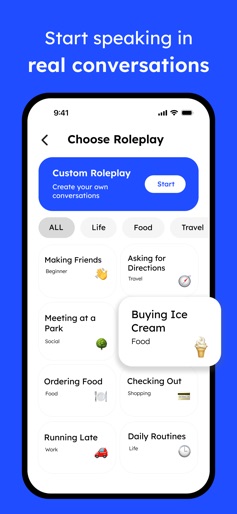
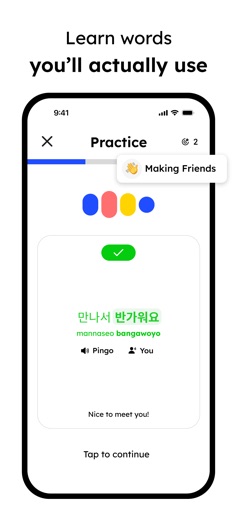
Learn a new language through real conversations with Pingo, your AI speaking companion. Loved by 3,000,000+ users, Pingo uses the most advanced AI built for language learning so you can have real-life conversations, get instant feedback, and learn words you’ll actually use. Speak to Pingo as you would a friend. Want to practice ordering at a café in Paris? Debate politics in Spanish? Or chat about K-dramas in Korean? Talk about your day, ask questions, and explore the language together. Practice speaking from 25+ languages to refine your vocabulary, become fluent, and speak confidently. Learn 25+ languages: English, Spanish, French, German, Japanese, Korean, Italian, Chinese, Portuguese, Russian, Arabic, Dutch, Turkish, Polish, Vietnamese, Hindi, Thai, Hebrew, Greek, Indonesian, Swedish, Norwegian, Danish, Persian, and Ukrainian. How to use Pingo AI* 1) Create or choose from engaging, real-life conversation scenarios. 2) Talk with an ultra-realistic AI that feels like a native speaker, adapting to your pace and skill level. 3) Receive actionable feedback and tips for improvement on grammar, fluency, vocabulary, engagement, and relevance for every conversation. 4) Use Tutor Mode for guided practice and review useful words to reinforce learning. 5) Get fluent faster and build lasting language confidence. Pingo AI transforms self-guided practice into a goal-oriented, interactive learning experience that’s far more effective than simply repeating basic phrases aloud or struggling to find opportunities for real-life conversations. Ditch static, repetitive modules and boring lessons. At Pingo AI, we’re building the most dynamic and immersive AI language learning experience ever to help you reach your language goals as fast as possible. If you have any ideas or questions, please email us at support@pingo.ai. *All conversations require a subscription Terms: https://pingo.ai/terms Privacy Policy: https://pingo.ai/privacy
Create screenshots like Language Learning: Pingo AI
Use FlyerBanana's free editor to create professional App Store screenshots inspired by Language Learning: Pingo AI's design. 100+ templates, device frames, and one-click export.










