

App Store Screenshots (10)
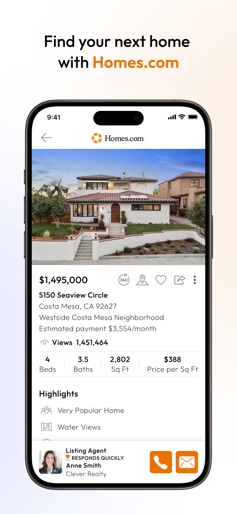


Design Analysis
Visual Design
Style: iOS Native
Key Features Shown
- •Map-based search with price markers
- •Matterport 3D Tours
- •Interactive Floorplans
- •Multi-source valuation estimates
- •Collaborative Favorites folders
App Insights
Target: US-based residential real estate buyers, renters, and licensed real estate agents looking for an alternative to Zillow/Redfin.
- •B2B Subscriptions (Homes Pro for agents)
- •Lead generation for listing agents
- •Premium agent directory placements
- •Data licensing via CoStar Group
ASO Keywords:
About Homes.com Real Estate Search
Trusted by 100 Million Buyers. Only Homes.com connects you directly to the person that knows the most about a property for sale, the listing agent. Homes.com: Homebuying as it should be. Hassle Free Search. Co-shopping made easy. In-depth neighborhood and school data Experience homebuying how it should be on the fastest growing site in the industry – designed for homebuyers and agents. Homebuyers With the Homes.com app you’ll have access to homes for sale and rent, easy access to the listing agent’s contact information, the most detailed information about neighborhoods and schools, a robust directory to find qualified buyer agents specializing in your search, mortgage calculators, home value estimates from 4 sources, historical photos, and the most advanced collaboration tools around to easily co-shop with friends, family and the agent you choose to work with. Agents Homes.com helps agents provide best-in-class service, build their brand and streamline their business. Homes Pro is built as an extension to Homes.com to provide free tools to agents to collaborate with clients in one central place. The tools included in Homes Pro help agents provide exceptional service that help guide homebuyers to finding their next home. Agents can easily manage their leads, collaborate with clients, and review feedback in real time. Agents can also share listings directly to their social media platforms and create CMAs for home buyers and sellers directly from Homes.com. A redefined Agent Directory allows agents to showcase their expertise and attract new clients by showcasing listing history, volume sold and specific areas that they focus on. An agent’s profile showcases even more with a detailed bio, awards, photos, videos and so much more to stand out to homebuyers. Here’s an at a glance view of what the Homes.com App offers for agents and homebuyers: • Find Homes for Sale and Rent: Browse real estate listings for sale across the U.S. including Foreclosures and New Construction sourced directly from the MLS’s and their data providers. • Map Search: Find nearby homes with the GPS driven location finder. Quickly zoom and navigate neighborhoods with interactive maps. • Current and Historical listing Photos: Get a detailed look at a property and see how it’s changed over time* • Estimate your monthly payments with our Mortgage Calculator: Utilize our built-in Mortgage Calculators for help understanding the true cost of the home. • Everything you need to know about neighborhoods and schools: - Our dedicated team of in-house researchers and photographers have partnered with some of the most-trusted sources, interviewed local experts, and personally explored the areas to curate the most detailed neighborhood overviews available anywhere to simplify your search. - Nearby schools and rankings from Niche and Great Schools - Parks and recreation - Walk scores and public transit - Restaurants and coffee shops - Churches - Farmers Markets, festivals and other social events • Collaborate and co-shop Like Never Before: - Free yourself from the chaos of email, text, PDF attachments, and missed phone calls. Agents and homebuyers can actively work to review feedback in real time, trade notes on homes and add a co-shopper to find the right home together. - Agents can provide best in class service and work with homebuyers directly on the site they are searching. • Exclusive Agent Features on Homes Pro - Collaborate, build your brand and manage your leads in one central location to provide exceptional service. - Connect with clients to power their search - Gain real-time client search insights and respond promptly - Create CMAs in minutes - Streamline your communications - Share listings on social - Build your brand with an enhanced agent profile * When available
Create screenshots like Homes.com Real Estate Search
Use FlyerBanana's free editor to create professional App Store screenshots inspired by Homes.com Real Estate Search's design. 100+ templates, device frames, and one-click export.











