Fluently - AI English Tutor icon

Fluently - AI English Tutor

Fluently, Inc.

Education
4.8(3.3K ratings)
Free
Create Screenshots Like Fluently - AI English Tutor

App Store Screenshots (9)

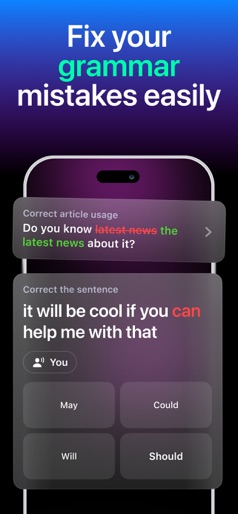
Fluently - AI English Tutor screenshot 1
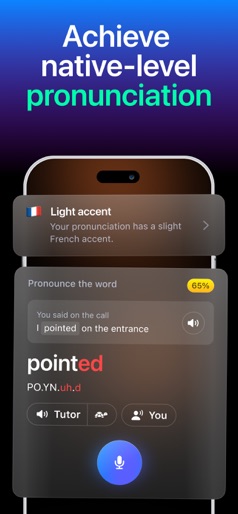
Fluently - AI English Tutor screenshot 2
Fluently - AI English Tutor screenshot 3
Fluently - AI English Tutor screenshot 4
Fluently - AI English Tutor screenshot 5
Fluently - AI English Tutor screenshot 6
Fluently - AI English Tutor screenshot 7
Fluently - AI English Tutor screenshot 8
Fluently - AI English Tutor screenshot 9

Design Analysis

Visual Design

App Insights

About Fluently - AI English Tutor

Fluently: Speak English with AI Tutor Stop memorizing boring rules. With Fluently, you practice speaking English in real conversations and get instant AI corrections — anytime, anywhere. HOW IT WORKS 1. Install Fluently 2. Talk with your AI tutor on any topic you like 3. Get real-time corrections and a personalized plan to improve faster WHY FLUENTLY? - Practice speaking, not just grammar drills - Real-time corrections: grammar, vocabulary, pronunciation - Personalized program based on your speech and interests - Boost your fluency and confidence in interviews, meetings, or everyday chats FEATURES - Unlimited speaking practice with AI tutor - Track your progress and see tangible improvements - Vocabulary growth and grammar support - Simple and intuitive design — start speaking instantly FLUENTLY PREMIUM Get unlimited access to personalized AI sessions, advanced feedback, and progress tracking. Subscriptions renew automatically unless canceled at least 24 hours before the end of the current period. Manage your subscription in iTunes Account Settings. Terms of Service: https://getfluently.app/tos Privacy Policy: https://getfluently.app/privacy License Agreement: https://www.apple.com/legal/internet-services/itunes/dev/stdeula/

Create screenshots like Fluently - AI English Tutor

Use FlyerBanana's free editor to create professional App Store screenshots inspired by Fluently - AI English Tutor's design. 100+ templates, device frames, and one-click export.


More Education Apps

View all

Frequently Asked Questions

How can I create screenshots like Fluently - AI English Tutor?
You can create App Store screenshots inspired by Fluently - AI English Tutor using FlyerBanana's free screenshot editor. Choose from 100+ templates, customize colors, text, and device frames, then export in all required sizes.
What screenshot sizes does Fluently - AI English Tutor use?
Fluently - AI English Tutor uses standard App Store screenshot sizes including 6.7" (1290×2796px), 6.5" (1284×2778px), and 5.5" (1242×2208px) for iPhones. FlyerBanana supports all required sizes with one-click export.
Can I use Fluently - AI English Tutor's screenshot style for my app?
Yes! While you shouldn't copy screenshots directly, you can use Fluently - AI English Tutor's design patterns as inspiration. FlyerBanana's templates let you create professional screenshots with similar layouts, color schemes, and visual styles.
What makes good Education app screenshots?
The best Education app screenshots clearly showcase key features, use consistent branding, include compelling copy, and follow App Store guidelines. Browse our Education inspiration gallery to see what top apps do well.