

Autel Charge - EV Charging
Autel New Energy Co., Ltd
Create Screenshots Like Autel Charge - EV ChargingApp Store Screenshots (7)



Design Analysis
Visual Design
Style: iOS Native
Key Features Shown
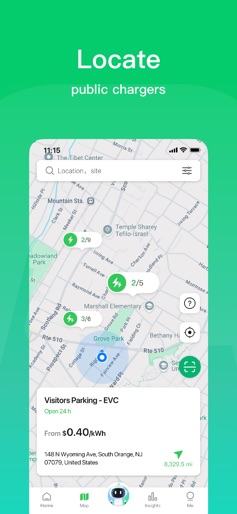
- •Public Charger Map
- •AI Voice Assistant (Max)
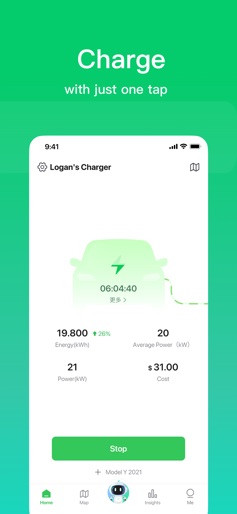
- •Real-time Charging Dashboard
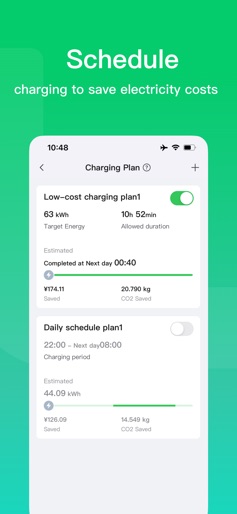
- •Scheduling/Energy Cost Planning
- •Home Device Management
App Insights
Target: EV owners requiring home charging management and public charging access, as well as property managers/hosts offering charging services.
- •Hardware-linked (Autel MaxiCharger)
- •Transaction fees from public charging
- •B2B/Enterprise solutions for property management
ASO Keywords:
About Autel Charge - EV Charging
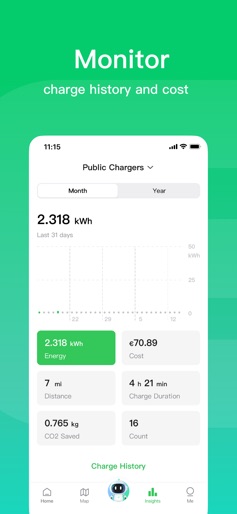
The Autel Charge application bring you an excellent experience when you're charging on Autel MaxiCharger at home or on the road. The advantages of our intelligent charging solutions for home use include: • Scan the QR code on your home charger to streamline the setup and configuration process. • Link Autel charge card to start and stop charging via it. • Fast and convenient charging via the Autostart feature. • Schedule charging sessions during off-peak times to reduce electricity costs. • View real-time charging statistics including: Power usage, energy costs, charging amperage, charge duration and much more! • View monthly energy consumption details. • Set your local energy prices to calculate charging costs using home chargers. • Distribute charging power evenly within a charger group to maximize charging efficiency within limited total charging power via dynamic load balancing. • Home Charger Sharing supporting sharing home chargers with other drivers for extra revenue. • Fast and convenient self-service invoicing for reimbursement of charging costs. • Convenient management of charge records by exporting charge history as Excel files by month. When on the road, the Autel Charge application offers the following features: • Start and stop charging using your Autel Charge card or by scanning the QR code on the public charger. • Displays the availability status of public chargers on the map. (available, in-use, out of order, etc.) • Filter chargers displayed on the map by desired connector types. • Filter by required charging power on the map. • View site information within the map including pictures, address, energy prices, hours of operation, quantity of chargers and connectors. • Navigate to a desired site using the integrated navigation map. • Link your credit card to streamline the payment process using public chargers. • Scan QR code to start and stop the charger with just one tap.
Create screenshots like Autel Charge - EV Charging
Use FlyerBanana's free editor to create professional App Store screenshots inspired by Autel Charge - EV Charging's design. 100+ templates, device frames, and one-click export.











