

App Store Screenshots (24)


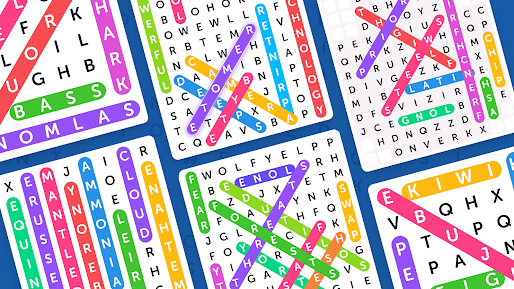

Design Analysis
Visual Design
Style: Custom
Key Features Shown
- •Level-based progression map
- •Themed word categories
- •Multi-colored word highlighting
- •Daily rewards system
- •Hint functionality
App Insights
Target: Casual gamers and puzzle enthusiasts looking for mental stimulation and vocabulary building.
- •Interstitial ads
- •Rewarded video ads
- •Banner ads
ASO Keywords:
About Word Search
Get the incredibly addicting word search game that everyone is talking about! Expand your vocabulary and show off your spelling skills as you search for all the hidden words. Word Search (also known as Word Seek, Word Find, Word Sleuth or Mystery Word) is a word game that consists of the letters of words placed in a grid. The objective of this puzzle is to find and mark all the words hidden inside the box. The words may be placed horizontally, vertically, or diagonally. Word Search Features: - 100+ different categories for your different moods - Starts off easy but gets challenging fast - Replay categories in Time mode or Classic mode - Daily challenges to earn extra rewards - Use the Hints when you get stuck - Enjoyable graphics with easy controls - NO WIFI? NO PROBLEM! Enjoy the word search puzzle anytime, anywhere! Forget the pen and paper - You'll never experience a dull moment once you have this most addicting word search game!
Create screenshots like Word Search
Use FlyerBanana's free editor to create professional App Store screenshots inspired by Word Search's design. 100+ templates, device frames, and one-click export.
More Brain Game Apps
View all

Jigsaw Puzzles - Block Puzzle
Brain Game


Single Line Drawing: Link Dots
Brain Game


Mahjong! Tile Puzzle
Brain Game

Family Savior: Screw Puzzle
Brain Game


Connect Dots: Puzzle Challenge
Brain Game


Hexa Sorting Puzzle
Brain Game