

App Store Screenshots (5)


Design Analysis
Visual Design
Style: iOS Native
Key Features Shown
- •Chat List Management
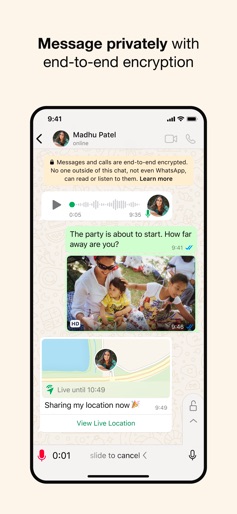
- •End-to-End Encryption Messaging
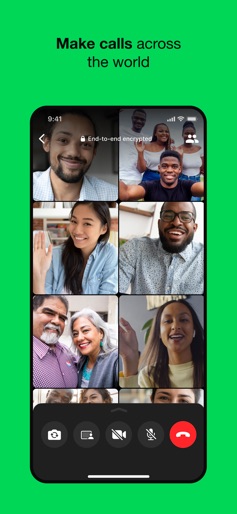
- •Group Video Calling (32 people)
- •Location Sharing
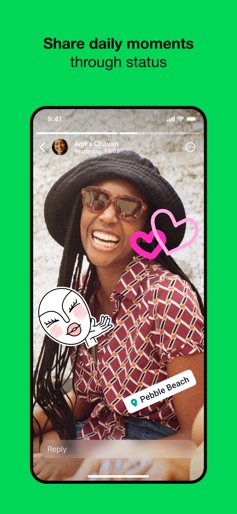
- •Status Updates/Stories
App Insights
Target: Global mobile users requiring reliable, cross-platform communication, particularly in regions where SMS is costly or unreliable.
- •WhatsApp Business API
- •In-App Purchases
- •Metadata Monetization (Meta Ecosystem)
ASO Keywords:
About WhatsApp Messenger
WhatsApp from Meta is a free messaging and calling app used by over 2 billion people across 180+ countries. It's super simple, reliable and private, making it perfect for staying in touch with your friends and family worldwide. WhatsApp works across mobile, tablet, and desktop even on slow connections, with no subscription fees*. Private messaging and calls across the world Your privacy is our priority. With end-to-end encryption, you can be sure that your personal messages and calls stay between you and who you send them to. And no one, not even WhatsApp, can read or listen to them. Simple and secure connections, right away All you need is your phone number - no usernames or logins needed. Easily view your contacts on WhatsApp and start messaging. And what's more, you can easily link your other devices, including iPads, for seamless connectivity. High quality voice and video calls Enjoy free, secure video and voice calls with up to 32 people for free. Your calls work across devices, even on slower connections, using your phone or tablet’s Internet service. Group chats to keep you in contact Stay close to friends and family through end-to-end encrypted group chats and calls. Share messages, photos, videos and documents across mobile, tablet, and desktop. You can also use call links and screen-sharing to make group calls and collaboration easy. Stay connected in real time You can share your location with those in your individual or group chats while using WhatsApp on your mobile phone. Or record a voice message for those moments when just text isn't good enough. Share daily moments through Status Share your everyday life with those who matter. With Status you can share text, photos, video, and GIF updates that disappear after 24 hours. You're always in control of who sees your status. Just choose who you want to share it with - all your contacts or selected ones. And bring your everyday to life. *Data charges may apply. Contact your provider for details. --------------------------------------------------------------------------- If you have any feedback or questions, please go to WhatsApp > Settings > Help > Contact Us Terms of Service: https://www.whatsapp.com/legal/terms-of-service Learn more about messaging privately: https://www.whatsapp.com/privacy Learn more about WhatsApp safety: https://www.whatsapp.com/security
Create screenshots like WhatsApp Messenger
Use FlyerBanana's free editor to create professional App Store screenshots inspired by WhatsApp Messenger's design. 100+ templates, device frames, and one-click export.










