App Store Screenshots (6)



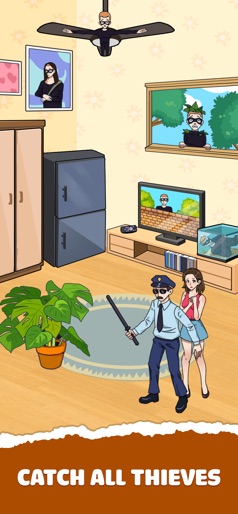


Design Analysis
Visual Design
Style: Custom
Key Features Shown
- •Narrative-based puzzles
- •Choice-based mechanics (Make them rich/shine)
- •Hidden object/Catch the thief
- •Before/After story progression
App Insights
Target: Casual mobile gamers interested in hyper-casual puzzles, meme culture, and prank-themed entertainment, primarily in emerging markets like Indonesia, Brazil, and Mexico.
- •In-App Purchases (Ad Removal)
- •Interstitial Ads
- •Rewarded Video Ads
- •Banner Ads
ASO Keywords:
About Tricky Prank: Brain Quest
Think outside the box, use smart strategies to find clever clues, and outsmart the pranksters. Welcome to Tricky Prank: Annoying Quest, where you’ll put your mind to the tricky quest and test your mind with the most hilarious and brain-teasing challenges! Think outside the box, use smart strategies to find clever clues, and outsmart the pranksters. * How to play: - Think Fast: Observe each scene and use your logic to discover the context. - Spot the Clue: Think outside the box and use creativity to overcome each challenge. - Find Out The Prank: Tap, swipe, drag, or combine objects in the right order to execute your prank. - Beat All Levels: Solve every brain-teasing puzzle and become the prank master. * Feature: - Creative Puzzle: Imaginative and unpredictable storylines with an endless stream of trending memes. - Unique Game Mechanics: Every level introduces surprising twists and humorous turns that test your smart thinking. - Humorous and Entertaining: Get ready to laugh as you solve tricky problems in the most unexpected ways. If you love whimsical storylines, humorous contexts, and surprise challenge puzzles, let’s try Tricky Prank: Annoying Quest. Download now and find out all the clues to track down the pranksters!
Create screenshots like Tricky Prank: Brain Quest
Use FlyerBanana's free editor to create professional App Store screenshots inspired by Tricky Prank: Brain Quest's design. 100+ templates, device frames, and one-click export.