
App Store Screenshots (7)



Design Analysis
Visual Design
App Insights
About Surfshark VPN: Fast VPN App
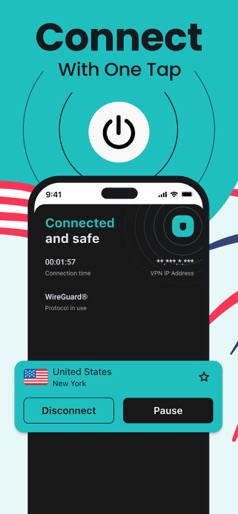
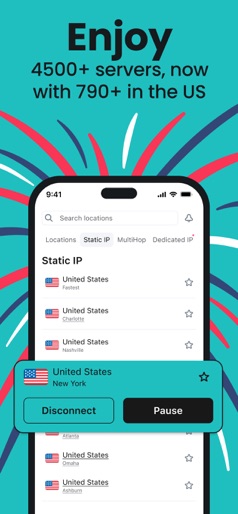
Surfshark: a private, fast, and secure VPN app that protects you online. Surfshark VPN delivers private, secure, and fast protection through powerful encryption, high-speed 10 Gbps servers, and helpful security tools such as an ad blocker, an email generator, and a data leak detector. ▶ How does Surfshark keep you safe online? Surfshark combines VPN security, identity protection, and browsing safety in one app. It supports unlimited device connections, provides a secure connection when traveling, and helps protect personal information online. STAY PRIVATE ONLINE EASILY ▶ How does Surfshark keep your data private? Surfshark VPN secures your IP address and online activity by encrypting your internet connection. It uses modern VPN protocols, including WireGuard, OpenVPN, and IKEv2, to protect traffic from third parties. ▶ Does Surfshark track what I do? Surfshark operates under a strict no-logs policy, which was independently audited by Deloitte in 2025, and does not track, collect, or store user activity, providing protection wherever the VPN is connected. ▶ Why use Alternative ID, Surfshark’s email generator? Surfshark’s email generator Alternative ID creates an alternative email address you can use online. It helps keep your primary email private when signing up for services and reduces unwanted exposure and data leak risk. PROTECT YOUR DEVICES FROM ADS ▶ How does Surfshark’s ad blocker work? Surfshark’s ad blocker blocks ads, pop-ups, and trackers. It also blocks access to known malicious domains, helping reduce exposure to harmful websites. ENJOY AWARD-WINNING VPN SERVICE AND EXTRA FEATURES ▶ How fast are Surfshark’s VPN servers? Surfshark VPN operates a global network of over 4,500+ servers across 100 countries. High-capacity, fast 10Gbps servers support stable connections for everyday activities like browsing and gaming. ▶ Can I secure unlimited devices with Surfshark VPN? Surfshark supports unlimited device connections under one account. You can use VPN on phones, laptops, tablets, smart TVs, and other devices without limits, and protect your entire household with a single account. ▶ What proxy features does Surfshark include? Surfshark lets you use proxy servers for quick, lightweight location changes directly through the browser extension. This gives you a fast, simple way to mask your IP address without a full VPN connection. ▶ Does Surfshark have DNS servers? Surfshark operates its own DNS servers to securely handle DNS requests and route users to legitimate websites. This helps reduce DNS-based attacks and bypass DNS-level blocking in certain regions, while keeping DNS queries private and handled by Surfshark only. TRAVEL AND ACCESS CONTENT SAFELY ▶ Why is Surfshark VPN good for travelers? Surfshark encrypts your connection on public Wi-Fi networks such as hotels, airports, and cafés while you travel. By changing your virtual location, you can access services typically available in your home country, such as online banking or streaming platforms, without exposing your real IP address. AUTO SUBSCRIPTION RENEWAL: • Surfshark is a paid VPN service, so you need a subscription to use it. • You will be billed through your Apple ID Account when you confirm the purchase. • The subscription renews automatically unless the auto-renew is turned off at least 24 hours before the end of the current billing period. • We will charge your account for renewal within 24 hours before the end of your subscription. • You can manage subscriptions and turn off auto-renewal by going to your App Store Account Settings. • Any remaining portion of the free trial will expire when you buy a subscription. For the Privacy Policy: https://surfshark.com/privacy-policy For the Terms of Service: https://surfshark.com/terms-of-service/
Create screenshots like Surfshark VPN: Fast VPN App
Use FlyerBanana's free editor to create professional App Store screenshots inspired by Surfshark VPN: Fast VPN App's design. 100+ templates, device frames, and one-click export.
More Privacy Apps
View all

VPN - Super Unlimited Proxy
Privacy


Now VPN - Fast Secure Proxy
Privacy

HideU: Calculator Lock
Privacy

NordVPN: VPN Fast & Secure
Privacy

Calculator - Hide Photo, Video
Privacy


Gallery Vault-Hide Photo Video
Privacy