

App Store Screenshots (8)




Design Analysis
Visual Design
Style: Custom
Key Features Shown
- •Customizable Physical Cards
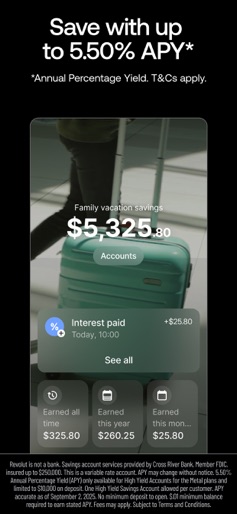
- •High-Yield Savings Accounts
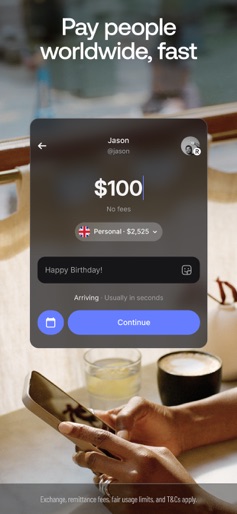
- •P2P Messaging & Payments
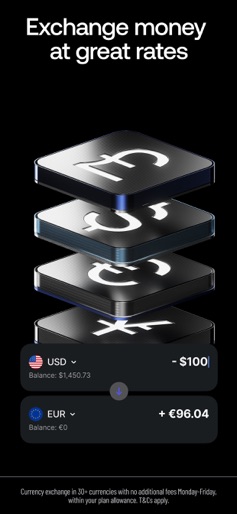
- •Multi-currency Exchange
- •Branding & Awards
App Insights
Target: Digital nomads, international travelers, retail investors, and parents looking for financial education tools for children.
- •Subscription tiers (Premium, Metal)
- •Interchange fees from card transactions
- •Currency exchange fees (above allowance)
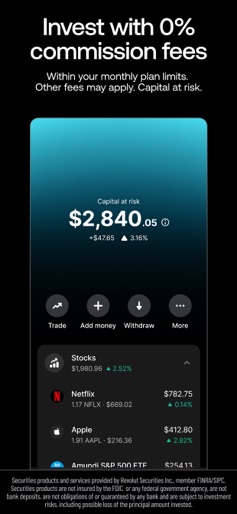
- •Stock trading commissions (above allowance)
- •Card personalization and delivery fees
- •Interest margin on deposits
ASO Keywords:
About Revolut: Send, spend and save
Track and simplify your finances with tools to help you pay, spend, and invest. Join the 70+ million customers worldwide who use our app to spend, send, and save smarter. Make your spend, well-spent Pay any way, with physical cards, virtual cards, single-use virtual cards for extra protection, Google or Apple Pay Spend abroad with great exchange rates (fees additional to the rate provided may apply) Access 55+ K in-network ATMs worldwide with no fees Link your external bank accounts to stay on top of all your spending Design a physical card you vibe with (fees may apply). Set your kids up for financial success. Get them a Revolut <18 account, with their own card, so they can learn about money in a safe and fun way Send money near, far, wherever they are Request or send 25+ currencies with a tap to anyone, anywhere Chat, send, and receive money, in one place. Whatever your plans, transfers are almost instant between your Revolut friends with P2P payments Split and settle bills in one place. You can even share a fun GIF to diffuse any tension Save the interest-ing way Grow your money with up to 4.25%* APY with Savings Vaults, Access your savings whenever you need to, with zero penalties or fees Build your savings effortlessly — set up recurring transfers and round up spare change to stash cash Explore Stock Trading (capital at risk) Start trading stocks from $1 (other fees may apply) Choose from 2,000+ stocks to invest in some of the world's most popular companies Enjoy no-commission stock trading within your monthly allowance (other fees may apply) All investments involve risk, including possible loss of principal. Investment accounts and disclosures may be displayed together. Self-directed brokerage products are provided by Revolut Securities Inc., member FINRA/SIPC. Brokerage Products • Not FDIC Insured • No Bank Guarantee • May Lose Value. Automated investing is provided by Revolut Wealth Inc, an SEC-registered investment adviser. End the overspend Get instant spending notifications to keep track of every payment Use smart budgeting and analytics tools to stop wondering where your money went, and start telling it where to go Worried about missing upcoming payments or subscription charges? Don't be — we'll notify you beforehand Upgrade to one of our paid plans to get exclusive cards, more benefits, and even cooler perks. Pick the plan that's right for you: Premium or Metal (Paid Plan T&Cs and subscription fees apply). Unlock security features that you control Freeze and unfreeze your card in a tap Use single-use cards with new details generated each time you use it, for an extra layer of protection Set spending limits and get notifications to keep track of your money How we protect your money Our sophisticated fraud prevention system flags high-risk transactions and pings you an alert, so you can spot scams, and nip 'em in the bud Extensive identity verification keeps sign-ups secure, and your account is protected with passcodes and biometrics We're available 24/7 via our in-app customer support Funds in your Revolut Prepaid Card Account are held at or transferred to Lead Bank, Member FDIC, and are insured by the FDIC up to $250,000 applicable limits by the FDIC in the event Lead Bank fails if specific deposit insurance requirements are met. See FDIC-Prepaid Cards and Deposit Insurance Coverage. California Privacy Notice: https://www.revolut.com/en-US/legal/privacy *The highest APY is available to users on a Premium or Metal plan. Annual Percentage Yield (APY) is a variable rate and subject to change. These APYs are accurate as of October, 20th, 2023. Monthly fees apply for Premium and Metal plans. Terms and Conditions Apply. No minimum amount required. Savings Vault services provided by Sutton Bank, Member FDIC Revolut Ltd (No. 08804411) is authorized by the Financial Conduct Authority under the Electronic Money Regulations 2011 (Firm Reference 900562). Registered address: 107 Greenwich Street, 20th Floor, New York, NY 10006
Create screenshots like Revolut: Send, spend and save
Use FlyerBanana's free editor to create professional App Store screenshots inspired by Revolut: Send, spend and save's design. 100+ templates, device frames, and one-click export.
More Finance Apps
View all

Zillow Real Estate & Rentals
Finance


Bank of America Mobile Banking
Finance


Robinhood: Trading & Investing
Finance


GEICO Mobile - Car Insurance
Finance


Branch: Instant Loan & Banking
Finance


FanDuel Sportsbook & Casino
Finance