

App Store Screenshots (7)

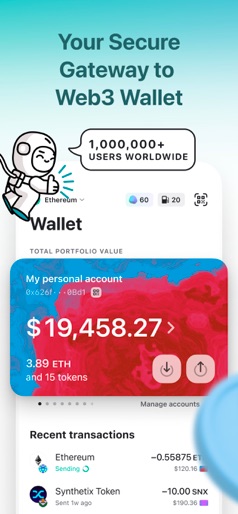


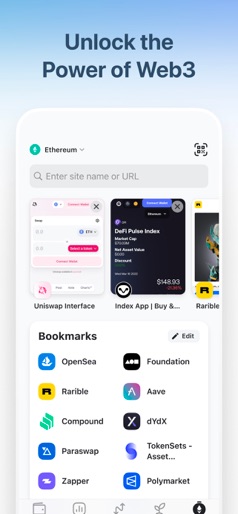


Design Analysis
Visual Design
Style: iOS Native
Key Features Shown
- •Portfolio Tracking
- •Transaction History
- •Token Market Trends
- •DApp Browser/Web3 Bookmarks
- •In-app Swaps/Buying
App Insights
Target: Ethereum-focused crypto investors, DeFi users, and Web3 enthusiasts ranging from beginners to advanced self-custody users.
- •Subscription (MEW MORE)
- •Swap fees (implied in DeFi features)
- •Fiat-to-crypto on-ramp partnerships
ASO Keywords:
About MEW crypto wallet: DeFi Web3
Create your Ethereum wallet, hold, send and receive ERC-20, ERC-721, ERC-1155 tokens and stablecoins, browse the decentralized web, use DeFi and Web3 sites. All that Ethereum has to offer in one mobile crypto wallet app that protects your privacy, keeps you safe, and gives you complete control of your funds. MEW doesn’t track or sell personal user data. MEW is an open source, non-custodial wallet created for the benefit of the Ethereum community. MAIN FEATURES - Create a secure, private Ethereum wallet. Your keys, your crypto. - Explore Web3 from your phone. - Hold, send and receive ETH and all Ethereum-based ERC-20 tokens. - Use multiple accounts for privacy and convenience. - Use decentralized finance (DeFi) and browse Web3 sites. - Stay in full control of your funds with a non-custodial wallet. - Protect your assets with state-of-the-art encryption with the use of secure enclave and local Keychain. - Learn about Ethereum, Blockchain, and best practices. MANAGE ALL ERC-20 TOKENS - Hold, send, and receive all Ethereum tokens and stablecoins. - No need to add custom tokens manually. Hide spam tokens and unwanted airdrops from accounts and balances. MONITOR CRYPTO MARKET - Explore tokens and monitor movements in the Markets Tab. - Charts and sparklines to help you monitor crypto market movements. MULTIPLE ACCOUNTS - Create multiple accounts and fluidly switch between them for privacy and convenience. - All accounts backed up and secured by one recovery phrase. WATCH ONLY ACCOUNTS - Import any wallet address to keep track of its assets. - Import another wallet address to watch what moves they are making in the crypto space. TRULY OWN YOUR CRYPTO AND STAY IN CONTROL - MEW wallet is a true, non-custodial Ethereum wallet. This means that you and only you have access to your crypto. - Your wallet is immediately active, no ID or approval required. Nobody can freeze your account or prevent you from doing anything you want with your crypto. - MEW doesn’t have access to your wallet. Your keys are secured locally on your device–be sure to make a backup! STAY SAFE WITH THE HIGHEST SECURITY STANDARDS IN THE SPACE - Your keys are secured in a vault on your mobile device using multiple layers of state-of-the-art encryption, giving your crypto protection comparable to a hardware wallet. - Backup your wallet with a 24 word recovery phrase so you can always access your crypto even if something happens to your phone. - Import any wallet with a 12-24 word recovery phrase. - Learn how to avoid common mistakes and stay safe in the world of crypto. INFORMATION ABOUT THE APP AND PURCHASE OPTIONS You can use MEW wallet app for free. An extended set of features, and regular portfolio performance updates are available for MEW MORE subscribers. You can subscribe to MEW more using the following plans: – 1 month – 1 year Subscription automatically renews unless auto-renewal is turned off at least 24 hours before the end of the current period. Payment will be charged to your iTunes account at confirmation of purchase. Manage your subscription in your device's Settings > Apple ID > Subscriptions. Terms and conditions: https://www.apple.com/legal/internet-services/itunes/dev/stdeula/
Create screenshots like MEW crypto wallet: DeFi Web3
Use FlyerBanana's free editor to create professional App Store screenshots inspired by MEW crypto wallet: DeFi Web3's design. 100+ templates, device frames, and one-click export.
More Crypto Apps
View all

Blockchain.com: Buy Bitcoin
Crypto


Blockchain.com: Buy BTC, SOL
Crypto


CT Pool: Crypto Mining App
Crypto


MetaMask - Crypto Wallet
Crypto

Bitcoin.com Wallet: Buy, Sell
Crypto

Exodus: Crypto Bitcoin Wallet
Crypto