

App Store Screenshots (7)

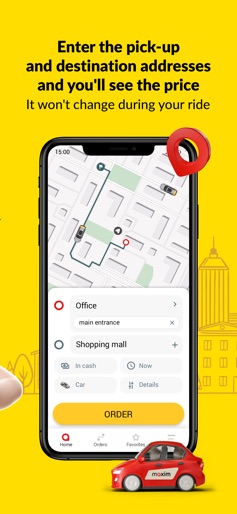


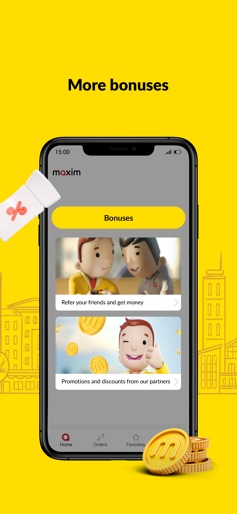


Design Analysis
Visual Design
Style: Custom
Key Features Shown
- •Promo code highlights
- •Driver rating and profile
- •Service selection (Food, Shop, Delivery)
- •Referral program
App Insights
Target: Budget-conscious commuters and urban residents in emerging markets (South Asia, CIS, Latin America) seeking multi-modal transport and delivery services.
- •Commission per ride
- •Delivery service fees
- •Service fees for additional requests (pets, luggage)
- •Corporate account management
ASO Keywords:
About maxim — order a taxi & food
The best way to appreciate the convenience of our app is to download it and start using it to order a taxi and other transport. Rates vary. Ride to the railway station, airport, or another city. Pay by cash or card. Enjoy discounts and promo codes. Since 2003, we’ve been developing innovative taxi ordering technologies, making our service more modern, affordable, and safe. Our service is helping millions of people save money as they commute and travel. Price If you need a cheap taxi every day, choose our Economy rate. If you value comfort, opt for the Comfort rate. We also have minivans, buses, and trucks. You can order a delivery of food, household cleaning products and other goods or medicine from shops and drugstores. You can see your ride price before tapping the Order button, which is useful for planning your budget. Don’t worry about traffic – you only pay extra for additional services that were not specified in the order. Enjoy the convenience of paying for rides with cash and a credit card. You can use a personal account that you refill whenever necessary for corporate or family rides. It’s easy to get discounted rides if you use a promo code or you are one of our regular clients. Order You can order a ride by filling in the From and To address fields or using a city map. You can also use your smartphone’s or tablet’s location services. A scheduled order helps you plan your rides for a convenient time. You can provide special requests for your ride to arrange any necessary additional services: specify information about children, pets, or luggage; or add another phone number to order a taxi for someone else from your phone. A driver can buy goods, medicine or groceries, and deliver them to your place. Launch our app on Wear OS smart watch to track your ride status. View a map to see available cars and your driver’s movement as he or she approaches your location. You can share your location while you are en route. This is an important feature for parents who want to know their children are safe. Leaving a ride rating affects the driver’s rating and helps us improve our service. Countries Argentina, Azerbaijan, Bangladesh, Brazil, Cambodia, Colombia, Dominican Republic, Indonesia, Kazakhstan, Laos, Malaysia, Peru, Philippines, Russia, South Africa, Tajikistan, Tanzania, Thailand, Uzbekistan, Vanuatu, Vietnam
Create screenshots like maxim — order a taxi & food
Use FlyerBanana's free editor to create professional App Store screenshots inspired by maxim — order a taxi & food's design. 100+ templates, device frames, and one-click export.
More Food & Drink Apps
View all

DoorDash: Food, Grocery, More
Food & Drink


Uber Eats: Food and Grocery
Food & Drink

Domino's Pizza USA
Food & Drink


Grubhub: Food Delivery
Food & Drink

Instacart: Groceries & Food
Food & Drink


Postmates - Food Delivery
Food & Drink