

App Store Screenshots (7)




Design Analysis
Visual Design
App Insights
About Manic EMU - Game Emulator
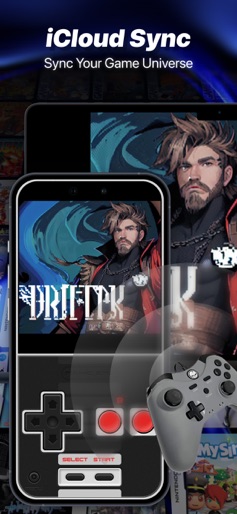
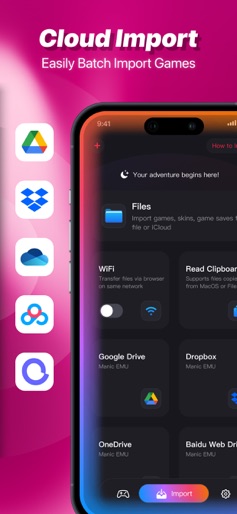
Manic EMU is your all-in-one retro gaming emulator. Step into the world of Manic EMU—where dreams and adventures begin! [Supported Platforms] Nintendo ▸ Nintendo 3DS(3DS) ▸ Nintendo 64(N64) ▸ Nintendo DS(NDS) ▸ Game Boy Advance(GBA) ▸ Game Boy Color(GBC) ▸ Game Boy(GB) ▸ Nintendo Entertainment System(NES) ▸ Super Nintendo Entertainment System(SNES) ▸ Virtual Boy(VB) ▸ PokeMini(PM) SONY ▸ PlayStation(PS1) ▸ PlayStation Portable(PSP) SEGA ▸ Sega Dreamcast(DC) ▸ Sega Saturn(SS) ▸ Sega Master System(MS) ▸ Sega Game Gear(GG) ▸ Sega SG-1000(SG) ▸ Sega Genesis 32X/Super 32X(32X) ▸ Sega CD/Mega-CD(MCD) ▸ Sega Genesis/MegaDrive(MD) Atari ▸ Atari 2600 ▸ Atari 5200 SuperSystem ▸ Atari 7800 ProSystem ▸ Atari Jaguar ▸ Atari Lynx More platforms coming soon! [Key Features] ▸ RetroAchievements: Unlock challenges, shine with your glory trophies ▸ Unlimited Saves: Manual & 50 auto-save slots ▸ 5x Speed: Control the game’s pace ▸ Cheat Codes: Unlimited library for perfect playthroughs ▸ Retro Filters: Immersive visual effects ▸ Custom Skins: Authentic feel, third-party compatible ▸ Screenshot Tool: Share your epic moments ▸ Landscape Mode: Enhanced gameplay experience ▸ Custom Shortcuts: Redefine your controls [iCloud Sync • Your Gaming Universe] ▸ Cross-device sync for games, saves, and settings ▸ Encrypted storage • Cloud backups • No progress loss ▸ Switch between phone and tablet seamlessly ▸ Play anywhere—your journey never pauses! [Cloud Integration • One-Click Import] ▸ Google Drive, Dropbox, OneDrive, Baidu Cloud, Aliyun ▸ WebDAV/SMB protocol support—access the entire web! [Controller Freedom • Play Your Way] ▸ Native Joy-Con/DUALSHOCK/Xbox support ▸ Bluetooth controllers/keyboards • Mac compatible ▸ Multi-controller connectivity ▸ Switch between solo play and multiplayer battles [Cross-Screen Play • Conquer the Big Screen] ▸ AirPlay mirroring for lag-free streaming ▸ Phone-to-TV switching for parties or couch gaming ▸ Big screen + controller = Ultimate immersion [Subscription Plans] Unlock premium features via iTunes auto-renewal. Choose Monthly, Yearly, or Lifetime plans. Payment is charged to your iTunes account. Cancel at least 24 hours before renewal. No refunds for active periods. To cancel: Go to Settings > Apple ID > Subscriptions and manage your plan. ▸ Privacy Policy: https://manicemu.site/privacy-policy/ ▸ Terms of Use: https://manicemu.site/terms-of-use/ ▸ Official Site: https://manicemu.site Email: support@manicemu.site [Legal Notice] This app is not affiliated with any game manufacturers. Platform names are used solely to describe supported environments. For inquiries, contact us—we’re here to help!
Create screenshots like Manic EMU - Game Emulator
Use FlyerBanana's free editor to create professional App Store screenshots inspired by Manic EMU - Game Emulator's design. 100+ templates, device frames, and one-click export.
More Entertainment Apps
View all

YouTube
Entertainment


Spotify: Music and Podcasts
Entertainment


TikTok - Videos, Shop & LIVE
Entertainment


Pandora: Music & Podcasts
Entertainment


Shazam: Find Music & Concerts
Entertainment


Photo Lab Picture Editor & Art
Entertainment