
App Store Screenshots (6)



Design Analysis
Visual Design
Style: Hybrid
Key Features Shown
- •JAL Mileage Bank Dashboard
- •QR Code Boarding Pass
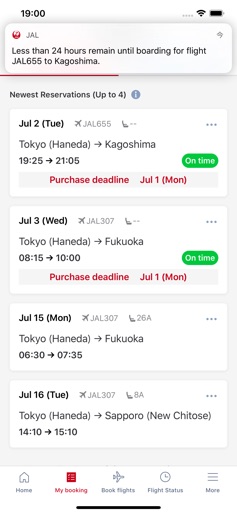
- •Multi-segment Itinerary View
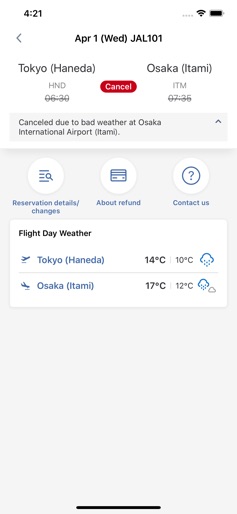
- •Flight Status Alerts (Delay/Cancel)
- •Weather Information for Destinations
- •Multi-city Booking Search
App Insights
Target: Domestic Japanese travelers and international passengers utilizing Japan Airlines and OneWorld partner networks.
- •Indirect revenue via flight bookings
- •Ancillary services (upgrades, seat selection)
- •Loyalty program retention (JMB)
ASO Keywords:
About Japan Airlines
The JAL app is now available for all flights and for both JMB and non-JMB members. Please download the JAL app to make reservations and purchases for all flights. <Main functions> 1.Home screen Display of reservation Reservations for flights will be displayed on the home screen. *Flight status will be displayed for flights up to the next day. Information of JMB member is displayed (when logged in). 2.Reservations You can make reservations for all flights. 3.Timeline By tapping the flight information on the home screen or My Booking, you can view more detailed information about your itinerary in chronological order according to your reservation and flight status. The display will automatically change according to the time and number of days until departure. 4.Flight Status You can check the flight status by route or flight number. For international flights, you can search for two days before or after. 5.Notification of flight status and reminder of reserved flights You can receive notifications of delays and cancellations, as well as reminders for flights that are less than 24 hours away from departure. If you have not updated the latest information in the app, or if you are using the app in an environment where the network is not connected for a long time, you may not receive Apple Inc. and Apple Japan Inc. are not involved in any way with the gift information posted on this app. Apple Inc and Apple Japan Inc. are not responsible for any damage caused by the use of the campaign information provided.
Create screenshots like Japan Airlines
Use FlyerBanana's free editor to create professional App Store screenshots inspired by Japan Airlines's design. 100+ templates, device frames, and one-click export.