
App Store Screenshots (4)



Design Analysis
Visual Design
Style: iOS Native
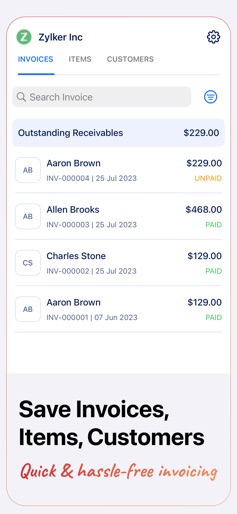
Key Features Shown
- •Manual Invoice Entry
- •Payment Status Tracking
- •PDF Preview
- •Multi-tab Data Management (Invoices, Items, Customers)
- •Sign-up/Sync Options
App Insights
Target: Freelancers, micro-business owners, and contractors needing quick, mobile-first billing solutions without complex accounting features.
- •Lead generation for Zoho ecosystem
- •Data acquisition
- •Brand awareness
ASO Keywords:
About Invoice Generator - Zoho
Create invoices and share them with your customers on the go. You can also save items, customer details, and invoices. Mark invoices as paid or unpaid and filter them based on payment status, add logos to invoices, and view outstanding payments. Here's what you can do with our free invoice generator app: CREATE INVOICES ON THE GO Create invoices in minutes at any time and from anywhere with the Zoho Invoice Generator app. AUTO GENERATE INVOICE NUMBER Zoho Invoice Generator automatically generates and assigns an invoice number to your transactions so you don't have to. ADD CUSTOMERS Add names, email ids, and addresses of customers you regularly service, and quickly invoice them. AUTO-FILL CUSTOMER DETAILS Eliminate tedious data entry by scanning customers' business cards and letting Zoho Invoice Generator auto-fill customer details for you. IMPORT CUSTOMER DETAILS FROM CONTACTS Save time by importing all your customers' details directly from mobile contacts. CREATE ITEMS Create and quickly save items that you regularly sell to your customers with Zoho Invoice Generator. SAVE INVOICES ON YOUR MOBILE With Zoho Invoice Generator, you can save invoices to your mobile phone for easy and quick access. SAVE INVOICES ON iCLOUD Never lose an invoice. Zoho Invoice Generator allows you to save your invoices to iCloud as backup. MARK INVOICES AS PAID/UNPAID Mark your invoices based on their status as paid and unpaid and also filter them based on status. VIEW OUTSTANDINGS View and keep a track of outstanding payments with Zoho Invoice Generator.
Create screenshots like Invoice Generator - Zoho
Use FlyerBanana's free editor to create professional App Store screenshots inspired by Invoice Generator - Zoho's design. 100+ templates, device frames, and one-click export.











