Harvest.io – 3D Farming Arcade icon

Harvest.io – 3D Farming Arcade

AZUR GAMES

Arcade
4.5(47.8K ratings)
Free
Create Screenshots Like Harvest.io – 3D Farming Arcade

App Store Screenshots (10)

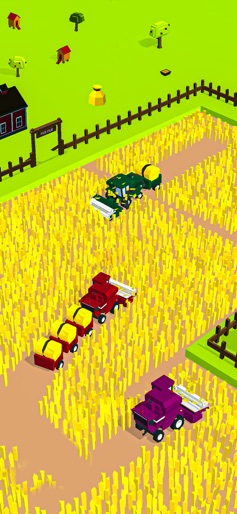
Harvest.io – 3D Farming Arcade screenshot 1
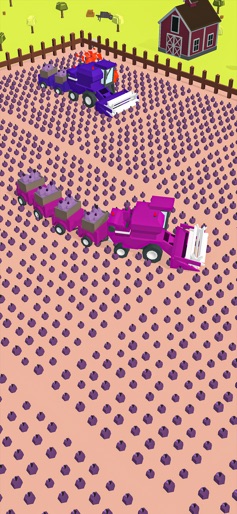
Harvest.io – 3D Farming Arcade screenshot 2
Harvest.io – 3D Farming Arcade screenshot 3
Harvest.io – 3D Farming Arcade screenshot 4
Harvest.io – 3D Farming Arcade screenshot 5
Harvest.io – 3D Farming Arcade screenshot 6
Harvest.io – 3D Farming Arcade screenshot 7
Harvest.io – 3D Farming Arcade screenshot 8
Harvest.io – 3D Farming Arcade screenshot 9
Harvest.io – 3D Farming Arcade screenshot 10

Design Analysis

Visual Design

Style: Custom

Colors:
accent
primary
secondary
Full-screen gameplayMinimalist HUDTop-down isometric perspective

Key Features Shown

  • 3D Combine Harvesters
  • Multiple Crop Types (Corn, Carrots)
  • Snake-like Trailer Growth
  • Competitive AI/Bot Interaction
  • Environment Variety (Barns, Fences)

App Insights

Target: Hyper-casual gamers looking for short, satisfying 'time-waster' sessions; fans of .io style games and snake mechanics.

Monetization:
  • Ad-supported (Interstitial, Rewarded Video)
  • In-App Purchases (Remove Ads)
  • Power-up/Boost purchases

ASO Keywords:

Harvestio3DFarmingArcade

About Harvest.io – 3D Farming Arcade

Try out Harvest.io - a new farming simulator in io style. You can drive the tractor all over the field to harvest crops! Watch the trailer with haystack behind you grow as you cut & plow it all up! But be careful, the trailer might get too big: don't bump into yourself or others. Harvest.io features: - Simple, snake-like mechanics of a farming simulator - A farming arcade in io style! - Satisfying game sessions: drive as long you want, but watch out for obstacles! - Circle the enemy and steal resources - Race with your competitors! - Colourful 3D graphics & different crops to harvest Become the fastest farmer in the village!

Create screenshots like Harvest.io – 3D Farming Arcade

Use FlyerBanana's free editor to create professional App Store screenshots inspired by Harvest.io – 3D Farming Arcade's design. 100+ templates, device frames, and one-click export.

More Arcade Apps

View all

Frequently Asked Questions

How can I create screenshots like Harvest.io – 3D Farming Arcade?
You can create App Store screenshots inspired by Harvest.io – 3D Farming Arcade using FlyerBanana's free screenshot editor. Choose from 100+ templates, customize colors, text, and device frames, then export in all required sizes.
What screenshot sizes does Harvest.io – 3D Farming Arcade use?
Harvest.io – 3D Farming Arcade uses standard App Store screenshot sizes including 6.7" (1290×2796px), 6.5" (1284×2778px), and 5.5" (1242×2208px) for iPhones. FlyerBanana supports all required sizes with one-click export.
Can I use Harvest.io – 3D Farming Arcade's screenshot style for my app?
Yes! While you shouldn't copy screenshots directly, you can use Harvest.io – 3D Farming Arcade's design patterns as inspiration. FlyerBanana's templates let you create professional screenshots with similar layouts, color schemes, and visual styles.
What makes good Arcade app screenshots?
The best Arcade app screenshots clearly showcase key features, use consistent branding, include compelling copy, and follow App Store guidelines. Browse our Arcade inspiration gallery to see what top apps do well.