

App Store Screenshots (5)
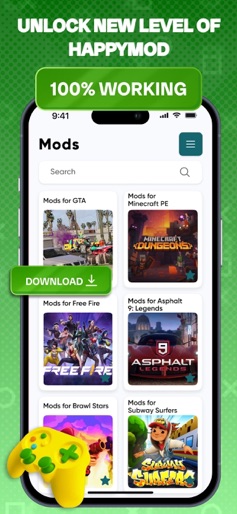
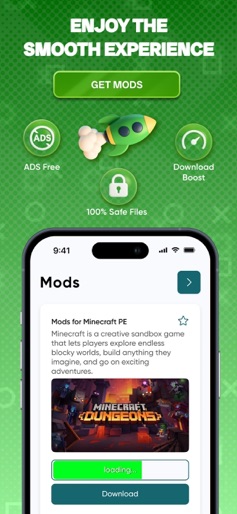


Design Analysis
Visual Design
Style: Custom
Key Features Shown
- •Mod Catalog
- •Download Manager
- •Community Reviews
- •Pro Tools (Streaming Mods)
- •Game Enhancements (God Mode, Free Currency)
App Insights
Target: Younger mobile gamers seeking competitive advantages (cheats/mods) in popular titles like Minecraft, GTA, and Roblox, as well as users looking for free access to premium streaming services.
- •Weekly Subscription
- •Monthly Subscription
ASO Keywords:
About HapMod : Happy Game Mods
HapMod – Happy Game Mods is your all-in-one hub for exploring creative modifications and enhancing your favorite mobile games. Designed for curious players and creators, the app features a wide range of mod packs, tools, and custom add-ons that help you experiment, transform gameplay elements, and discover new possibilities across different genres. From adventure worlds to racing challenges and simulation builders, HapMod offers a diverse selection of community-inspired content that keeps every session fresh and exciting. Each pack is organized for quick browsing and safe installation, making it easy to unlock new ideas and features while staying in control of your experience. Premium Features: Game enhancement mod collections Custom character and item add-ons Performance and gameplay boosters Visual themes and creative effects Interactive guides and tutorials Smooth installation and setup Regularly updated content packs Subscription Information Please note: access to premium tools and content requires an active subscription. Free features are not included. Subscription Plan: Plus Game: $8.99 / 7 days Exclusive Game: $20.99 / 1 month Payment is charged to your iTunes Account upon purchase confirmation. Subscriptions automatically renew unless auto-renewal is disabled at least 24 hours before the end of the billing cycle. Renewal charges occur within 24 hours before the current period ends. Subscriptions can be managed or canceled anytime in your Account Settings. Any unused portion of a free trial (if available) is forfeited once a subscription is purchased. For more details, please review our Privacy Policy and Terms of Use before using the app. Privacy Policy: https://docs.google.com/document/d/1tXtvzZFsVhTy8AxLgzbry95JGHWHN0J1yAQ8VM5U2mE/edit?usp=sharing Terms of Use: https://docs.google.com/document/d/1ylwl_67h4N540pZJ1FrT8_V8G3_-NFXSdTHmwJhZqrs/edit?usp=sharing
Create screenshots like HapMod : Happy Game Mods
Use FlyerBanana's free editor to create professional App Store screenshots inspired by HapMod : Happy Game Mods's design. 100+ templates, device frames, and one-click export.
More Entertainment Apps
View all

YouTube
Entertainment


Spotify: Music and Podcasts
Entertainment


TikTok - Videos, Shop & LIVE
Entertainment


Pandora: Music & Podcasts
Entertainment


Shazam: Find Music & Concerts
Entertainment


Photo Lab Picture Editor & Art
Entertainment