

App Store Screenshots (5)

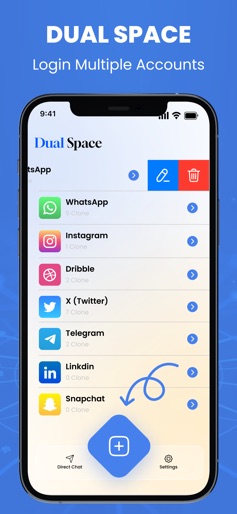



Design Analysis
Visual Design
Style: iOS Native
Key Features Shown
- •App Cloning/Adding
- •Multi-account list management
- •Custom App Naming
- •Direct Chat utility
- •Passcode protection
App Insights
Target: Users in emerging markets needing to separate personal and professional social media personas or manage multiple gaming accounts on a single device.
- •In-App Purchases (IAP)
- •Ad-supported
- •Premium subscription for ad-removal
ASO Keywords:
About Dual Space Lite-Multi Accounts
Dual Space Lite is a powerful tool that lets you run multiple accounts of the same app simultaneously on one device. Whether for social media, messaging apps, or gaming, you can enjoy seamless access to two or more accounts without the need for constant switching or logging in and out. Main Features: - Multiple Accounts: Run several accounts of the same app simultaneously in one place, saving time and enhancing convenience. - Custom App Creation: Create and customize apps with a unique name and logo for a personalized experience. - Direct Chat without Saving Contacts: Initiate conversations with others via messaging apps without having to save their phone numbers in your contacts. - App Lock with PIN: Protect your privacy by securing the app with a PIN, ensuring that only you can access your private spaces. Dual Space Lite brings efficiency, security, and flexibility to your multitasking needs, all while keeping your apps organized and secure. EULA:- https://dualapplite.blogspot.com/2025/02/eula.html
Create screenshots like Dual Space Lite-Multi Accounts
Use FlyerBanana's free editor to create professional App Store screenshots inspired by Dual Space Lite-Multi Accounts's design. 100+ templates, device frames, and one-click export.
More Productivity Apps
View all

Microsoft Outlook
Productivity


AVG AntiVirus & Security
Productivity


Screen Recorder - XRecorder
Productivity


Opera: Private Web Browser
Productivity


Parallel Space - app cloning
Productivity


Duolingo - Language Lessons
Productivity