

Designkit: Ecommerce Creatives
Xiamen Meitu Technology Co., Ltd.
Create Screenshots Like Designkit: Ecommerce CreativesApp Store Screenshots (8)






Design Analysis
Visual Design
Style: Custom
Key Features Shown
- •AI Prompt-to-Image
- •AI Product Listing Generation
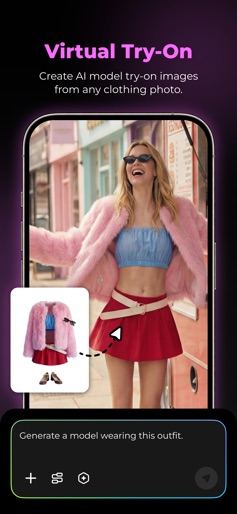
- •Virtual Try-On
- •Multi-language Localization
- •Poster Generation
App Insights
Target: E-commerce sellers on Shopify, Etsy, Amazon, and eBay, as well as social media content creators and small business owners globally.
- •Auto-renewable subscriptions (Monthly/Annual)
- •Freemium feature gating
- •In-app purchases for Pro features
ASO Keywords:
About Designkit: Ecommerce Creatives
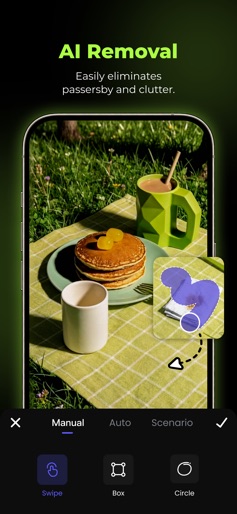
Designkit is an AI product photo editor built for sellers and creators. It helps you generate high-quality, platform-ready e-commerce images in seconds, perfect for Shopify, Etsy, eBay, Amazon, and social media shops. How Designkit Helps You: From a single request to a complete set of visuals, Designkit automatically analyzes your product features and style preferences to determine the ideal design solutions. Just enter one sentence, and the AI will generate a full collection of e-commerce images, including main images, supporting visuals, and complete product detail pages. Sell globally with fully automated localization. Designkit adapts language, style, tone, and cultural elements to create visuals optimized for each platform and market. Generate images in bulk for multiple SKUs and bring your products to market faster than ever. Create at scale with confidence. Save your design workflow as reusable templates and let the AI generate consistent visuals for 10 or 1,000 products with ease. More AI tools included: • Background Remover — Instantly remove backgrounds with pixel-perfect precision. • AI Background Generator — Create realistic lifestyle scenes from 500+ presets or simple text prompts. • Image Enhancer — Sharpen, enhance, and upscale images to HD and Ultra HD quality. • Object Remover — Remove unwanted objects, text, and distractions seamlessly. • AI Image Extender — Expand images in any direction without losing quality, perfect for banners and listings. Designkit helps you focus on what really matters: growing your e-commerce business. Want a more powerful design experience? Upgrade to Designkit Pro to unlock more advanced features and create with greater efficiency and flexibility. Subscription Information: By subscribing to Designkit Pro, you gain access to additional advanced features and an enhanced design experience. Subscription fees are charged monthly or annually to your Apple ID account upon confirmation of purchase. You can manage your subscription and turn off auto-renewal at any time in your Apple ID account settings. Your subscription will automatically renew unless auto-renewal is turned off at least 24 hours before the end of the current billing period. If you cancel your subscription, your benefits will remain available until the end of the current billing period. Contact Us Have feedback, questions, or feature requests? Reach out to us at: support@designkit.com Terms of Service: https://www.designkit.com/terms-of-service Privacy Policy: https://www.designkit.com/privacy-policy
Create screenshots like Designkit: Ecommerce Creatives
Use FlyerBanana's free editor to create professional App Store screenshots inspired by Designkit: Ecommerce Creatives's design. 100+ templates, device frames, and one-click export.











