
App Store Screenshots (4)


About Desh Hindi Keyboard
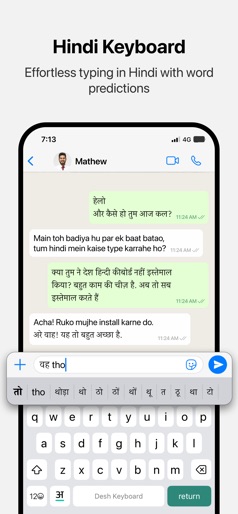
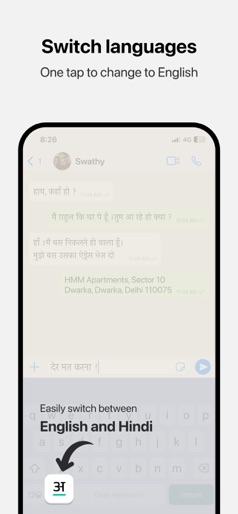
Desh Hindi Keyboard is a keyboard extension that makes Hindi typing super easy: • Type in English letters and get Hindi words with our transliteration technology • Type faster using word predictions • Easily switch to English with the language key • Word predictions and spell-correct is available in English also • Emoji button is available after pressing 123 Open the app and follow instructions to get your new Hindi keyboard: • Enable keyboard from settings • Activate the keyboard by holding the Globe icon and selecting "Desh Hindi Keyboard" • Type Hindi everywhere! Allowing full access: • When enabling the keyboard, you may enable "Allow Full Access" • This allows us to access crash reports and will help us improve the stability of the app • We respect your privacy. No personal information is collected • A standard warning is shown when you enable any downloaded keyboard app How to access settings: • Tap on the ⋯ button after opening the app and tap Settings. This option will be available after keyboard is activated • Available settings: sound on key press, vibrate on key press, emoji row, number row Using the clipboard: • The clipboard lets you save text that you frequently use and paste them easily • After you copy any text, it can be viewed from the clipboard by tapping on "Paste copied text". You can use the Pin button to save it permanently • To show copied text automatically when clipboard is opened, you can change the "Paste from Other Apps" setting to "Allow" Using stickers to make your chats more fun: • Open the stickers page by clicking on the sticker icon on the keyboard. Click on any sticker you like to copy it • Navigate back to your chat app and use your phone's Paste option in the message box • The sticker will be pasted in the chat. Note that animations are currently sent as GIFs due to technical limitations Do share your feedback and help us improve Desh Hindi Keyboard. And don't forget to leave a review if you like it.
Create screenshots like Desh Hindi Keyboard
Use FlyerBanana's free editor to create professional App Store screenshots inspired by Desh Hindi Keyboard's design. 100+ templates, device frames, and one-click export.