

Chess Master: Board Game
One Way Street Entertainment
Create Screenshots Like Chess Master: Board GameApp Store Screenshots (22)

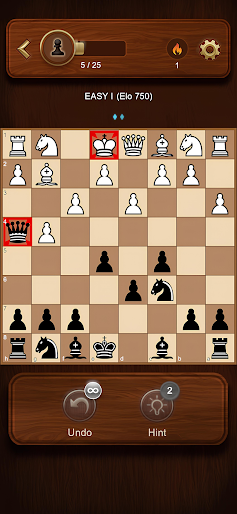


Design Analysis
Visual Design
Style: Hybrid (Skeuomorphic wood elements with flat Material piece icons)
Key Features Shown
- •ELO-based difficulty levels
- •Move hints with visual arrows
- •Undo functionality
- •Piece movement tutorials
- •Progress tracking (5/25 challenges)
App Insights
Target: Casual gamers and beginner chess enthusiasts looking for a free, offline-capable mobile experience, primarily in Latin American and European markets.
- •Interstitials
- •Banner ads
- •Potential rewarded video for hints/undo
ASO Keywords:
About Chess Master: Board Game
Be ready to play the most iconic and intellectually stimulating board games in the world! Strategic thinking, tactical maneuvers, and precise planning are the keys to conquering the game 🎲. ♟️ How to play? • The objective of the game is to checkmate your opponent's king 👑, putting it in a position where it cannot escape capture. • Pieces have unique movements: pawns, knights, bishops, rooks, queens, and kings. Each piece contributes to a well-coordinated attack or defense. • Anticipate your opponent's moves, analyze the board, and plan your strategy accordingly. 🧠 • Make use of powerful tactics such as castling, en passant, and promotion to gain an advantage. ♗ Why choose Chess? • Start playing immediately with a single tap. • Designed specifically for mobile and tablet devices. • Easy-to-use interface with a sleek and modern aesthetic. • Intelligent and adaptive AI opponents that provide a challenging experience for players of all levels. • Choose from different game modes, including casual matches or intense tournaments. • Save and resume your games at any time, ensuring uninterrupted gameplay. ♜ Learn strategies ⭐ Control the center of the board. ⭐ Develop your pieces (bring them out to active positions). ⭐ Protect your king by castling early. ⭐ Think ahead, anticipate your opponent's moves, and formulate a plan. Chess is completely FREE to play, offering you endless hours of strategic entertainment. Challenge yourself and elevate your chess skills to new heights. Download now and experience the unparalleled depth and excitement of the classic game of chess.
Create screenshots like Chess Master: Board Game
Use FlyerBanana's free editor to create professional App Store screenshots inspired by Chess Master: Board Game's design. 100+ templates, device frames, and one-click export.






