Chess Clash: Online & Offline icon

Chess Clash: Online & Offline

Miniclip.com

Board
4.7(2.7K ratings)
Free
Create Screenshots Like Chess Clash: Online & Offline

App Store Screenshots (9)

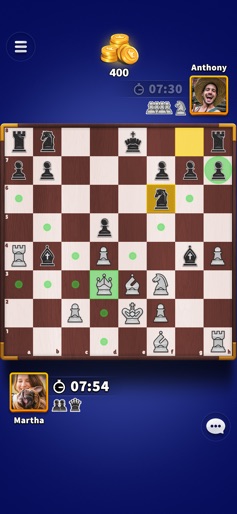
Chess Clash: Online & Offline screenshot 1
Chess Clash: Online & Offline screenshot 2
Chess Clash: Online & Offline screenshot 3
Chess Clash: Online & Offline screenshot 4
Chess Clash: Online & Offline screenshot 5
Chess Clash: Online & Offline screenshot 6
Chess Clash: Online & Offline screenshot 7
Chess Clash: Online & Offline screenshot 8
Chess Clash: Online & Offline screenshot 9

Design Analysis

Visual Design

App Insights

About Chess Clash: Online & Offline

Test your logical skills with Chess Clash! Chess is one of the most popular strategy games of all time. Your goal is to capture your opponent's pieces and checkmate their king. Play online and compete with players from all over the world. Invite your friends and challenge them to a match. Chat and exchange gifts with other players. Try the two game modes — play the ‘Classic Chess’ mode for a relaxed match or the ‘Quick Chess’ mode for a more fast-paced match. Choose from a number of arenas that offer different match prizes. Unlock and collect beautiful chess sets as you progress in the game. Get free rewards every day! Compete with other players on the Leaderboards. Climb them up and win big prizes. Key Features: ►Online multiplayer game ►Free daily rewards ►Invite and play with friends ►Chat with players and exchange gifts ►Multiple arenas with different prizes ►Two game modes — Classic Chess and Quick Chess ►Collect unique Chess pieces and Chess boards ►Compete with other players on the Leaderboard ►Supports offline play with computer Stay tuned for more exciting features. Download now and unleash the Chess master in you! This game includes optional in-game purchases (includes random items).

Create screenshots like Chess Clash: Online & Offline

Use FlyerBanana's free editor to create professional App Store screenshots inspired by Chess Clash: Online & Offline's design. 100+ templates, device frames, and one-click export.


More Board Apps

View all

Frequently Asked Questions

How can I create screenshots like Chess Clash: Online & Offline?
You can create App Store screenshots inspired by Chess Clash: Online & Offline using FlyerBanana's free screenshot editor. Choose from 100+ templates, customize colors, text, and device frames, then export in all required sizes.
What screenshot sizes does Chess Clash: Online & Offline use?
Chess Clash: Online & Offline uses standard App Store screenshot sizes including 6.7" (1290×2796px), 6.5" (1284×2778px), and 5.5" (1242×2208px) for iPhones. FlyerBanana supports all required sizes with one-click export.
Can I use Chess Clash: Online & Offline's screenshot style for my app?
Yes! While you shouldn't copy screenshots directly, you can use Chess Clash: Online & Offline's design patterns as inspiration. FlyerBanana's templates let you create professional screenshots with similar layouts, color schemes, and visual styles.
What makes good Board app screenshots?
The best Board app screenshots clearly showcase key features, use consistent branding, include compelling copy, and follow App Store guidelines. Browse our Board inspiration gallery to see what top apps do well.